Real-time video intelligence can give responders valuable context during an emergency. But the way that video enters the response depends on what recognizes the incident first. AI threat detection can identify a potential event visible to a camera. Other times, a person recognizes the problem first and directly requests help.
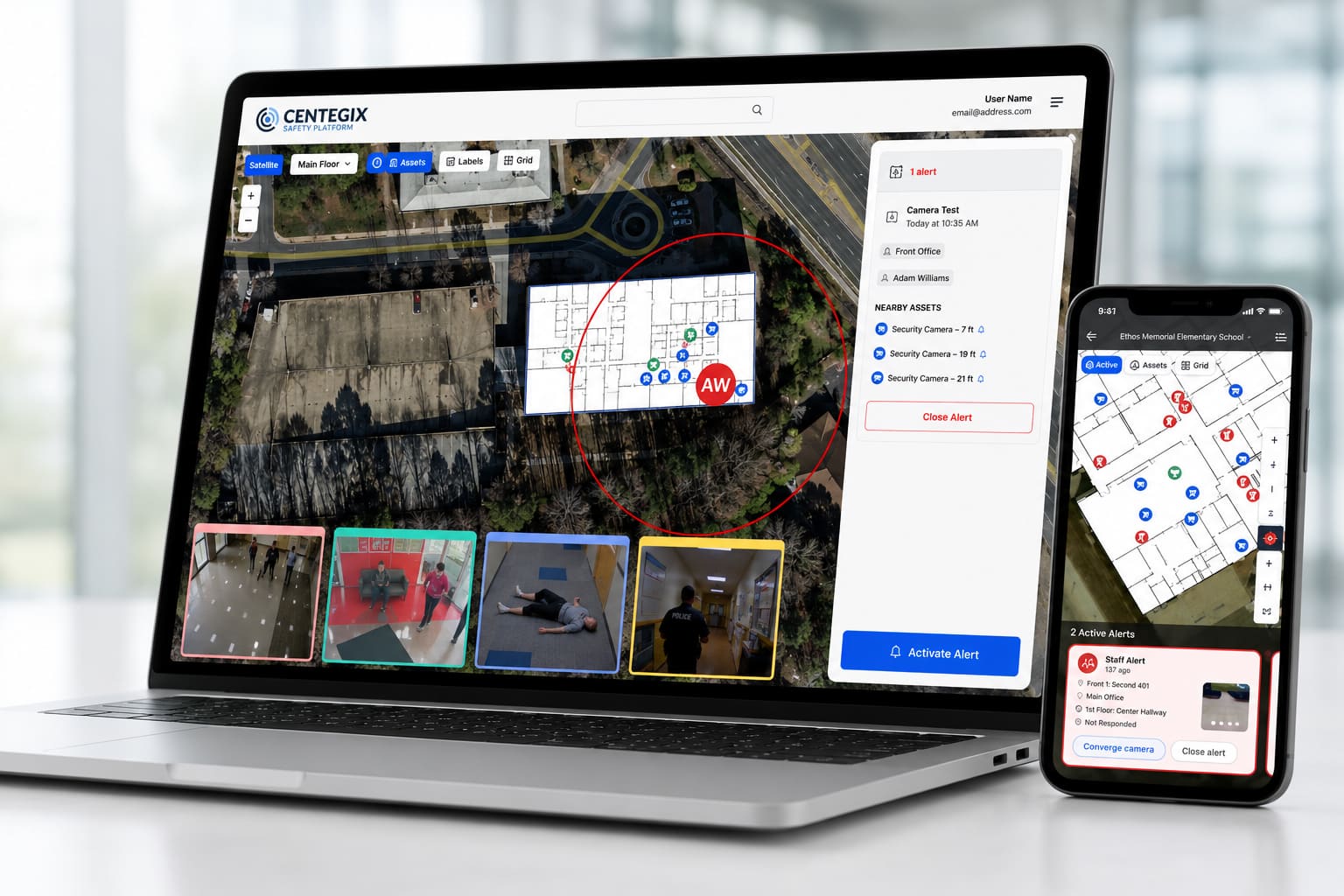
The CrisisAlert™ wearable panic button gives staff a direct way to request help from wherever an incident occurs. Through CENTEGIX integrations with Rhombus, that badge activation can also surface live video from the four cameras closest to the alert.
With CrisisAlert and Alert Activated Video, human judgment initiates the response. The alert location then connects responders with real-time video from the surrounding area, providing a more direct path to situational context.
Key takeaways
- A staff member initiates the response by activating a CrisisAlert wearable badge.
- CrisisAlert identifies who requested help and where the alert originated.
- The four nearest Rhombus cameras activate instantly.
- Responders can access relevant live video without manually searching for the correct feeds.
- The workflow connects a human request for help with location and visual context.
- Alert Activated Video adds a human-initiated path to real-time video intelligence.
What is Alert Activated Video?
Alert Activated Video is a response workflow in which a CrisisAlert wearable badge activation automatically surfaces live video from the cameras closest to the alert location.
Unlike AI security camera alerts, the cameras do not initiate the alert. A person recognizes an emergency and presses their CrisisAlert badge. That activation connects authorized responders with nearby video through Alert Activated Video.
The direction of the workflow is:
CrisisAlert activation → precise alert location → nearest cameras → live video for responders
How does Alert Activated Video work?
The Alert Activated Video model follows three primary steps:
- Someone presses a CrisisAlert badge. A staff member can activate the wearable badge from anywhere on the organization’s campus.
- The closest cameras activate. Through a supported Rhombus integration, the four cameras closest to the alert appear immediately.
- Responders access live video. Authorized responders can view video from the area where the alert originated.
There is no need to search manually across camera feeds. The staff member’s alert location determines which cameras are most relevant.
Why does real-time video intelligence need a human-activated path?
AI threat detection can provide valuable awareness, but it can only analyze what connected cameras can see.
A person may recognize a medical emergency inside a room without camera coverage, a verbal threat without an obvious visual indicator, subtle behavioral escalation, or a dangerous situation developing outside a camera’s field of view. A staff member may also understand the context of an interaction before it meets the configured criteria for an AI-generated alert.
CrisisAlert keeps the person closest to the incident in control of requesting help. Staff do not have to wait for a camera-based system to recognize the event, reach a wall-mounted button, find a phone, or open an application. They can initiate an alert directly from their wearable badge.
This combination reflects the layered approach recommended in the CISA K–12 School Security Guide, which uses a systems-based methodology rather than depending on a single physical security measure.
Benefit: Responders do not have to search for the correct camera
A large campus may have hundreds or thousands of security cameras. Even when coverage is extensive, finding the correct feed during an emergency can require someone to identify the building, determine the floor or room, search for nearby camera names, and open multiple feeds.
CrisisAlert already provides the alert location. The Rhombus integration uses that information to surface the four nearest cameras automatically. The feeds responders are most likely to need are already available on screen.
Benefit: Location and video work together
Video without a precise starting location can be difficult to navigate. Location without visual context may not tell responders what they will encounter.
Alert Activated Video brings those two types of information together. The badge activation tells responders who requested help and where the alert originated. Live video then provides an additional view of the surrounding area.
This combination can help responders assess the apparent severity of the incident, how many people are involved, whether someone appears injured, whether the situation is moving, and what resources may be needed.
The U.S. Department of Education’s emergency-planning guidance emphasizes comprehensive emergency operations plans that clarify roles and are developed collaboratively with community partners. Technology is most useful when its alerts and information are incorporated into those established responsibilities and response procedures.
Benefit: Live video supports more informed decisions
During an emergency, responders often begin making decisions before they arrive. Real-time video intelligence can help them better understand what is occurring, prepare for the conditions they may encounter, and coordinate personnel or resources accordingly.
For example:
- During a physical altercation, video may show how many people are involved.
- During a medical emergency, video may help confirm the area where assistance is needed.
- During suspicious activity, responders may be able to observe a person’s direction of movement.
- During a critical threat, video may provide important context about conditions near the alert location.
The goal is not continuous surveillance. It is to provide relevant visual information when someone has actively requested help.
Benefit: Privacy remains under responder control
Alert Activated Video does not require someone to continuously watch every camera. When a CrisisAlert activation occurs, the system surfaces the four cameras nearest to the alert. This connects video access with an active safety event and keeps control of the feed with the people responsible for responding.
Benefit: Existing security cameras become part of the response
Organizations may already have substantial investments in existing security cameras. The challenge is making those cameras useful at the exact moment someone needs help.
Customers already using Rhombus can add CrisisAlert with Alert Activated Video without installing an entirely separate camera system. Instead of operating as isolated tools:
- CrisisAlert initiates the alert.
- Location information identifies where help is needed.
- Rhombus provides live video.
- Safety Blueprint® adds mapping and facility context.
- The CENTEGIX Safety Platform supports coordinated response as a whole.
This creates a connected school safety technology strategy and helps organizations get more value from existing infrastructure.
Explore CENTEGIX Safety Network integrations to see how existing safety systems can work together.
How does human-activated video differ from AI-activated video alerts?
AI-activated video and Alert Activated Video use the cameras differently.
With AI-activated video alerts, VOLT analyzes camera feeds and pushes a human-verified event into the CENTEGIX Safety Platform. That model can include AI weapon detection, fight detection, medical emergencies, unauthorized access, and behavioral escalation.
With Alert Activated Video, the staff member initiates the alert with their CrisisAlert badge. The system then activates the four cameras nearest to that person’s location.
One begins with technology identifying a visible event. The other begins with a person requesting help. Both use real-time video intelligence to strengthen incident detection and response.
What outcomes can Alert Activated Video support?
Connecting a wearable alert with nearby live video can support:
- Immediate access to relevant camera feeds
- Less time spent locating the correct video
- Greater situational awareness
- More informed response decisions
- Improved preparation before responders arrive on scene
- Better coordination among safety personnel
- Greater value from existing security cameras

Frequently asked questions about Alert Activated Video
How many cameras activate when a CrisisAlert badge is pressed?
The four cameras closest to the CrisisAlert alert location activate through a supported Rhombus integration. This allows responders to access the feeds most relevant to the area where help was requested.
Is someone continuously watching the camera feeds?
No. When a CrisisAlert activation occurs, the system surfaces the four nearest cameras. The workflow provides incident-specific access rather than requiring continuous human monitoring of every feed.
Does Alert Activated Video require AI threat detection?
No. Alert Activated Video begins when a person presses a CrisisAlert wearable badge, not when AI identifies an event. AI-activated video alerts and Alert Activated Video are separate but complementary response paths.
Which camera systems support Alert Activated Video?
CENTEGIX Alert Activated Video currently supports the alert-activated workflow described in this article through an integration with Rhombus. Organizations should confirm compatibility with CENTEGIX for their specific camera environment and configuration.
What happens if an incident is outside camera coverage?
CrisisAlert can still transmit the staff member’s request for help and precise alert location. Available video context will depend on whether supported cameras cover the area near the alert.
Put real-time video intelligence into the response workflow
Cameras cannot recognize every emergency or understand every situation. CrisisAlert gives staff a direct path to help, while Rhombus delivers immediate visual context from the closest cameras to responders. To see how real-time video intelligence enters the response when a person requests help, request a custom demo.